


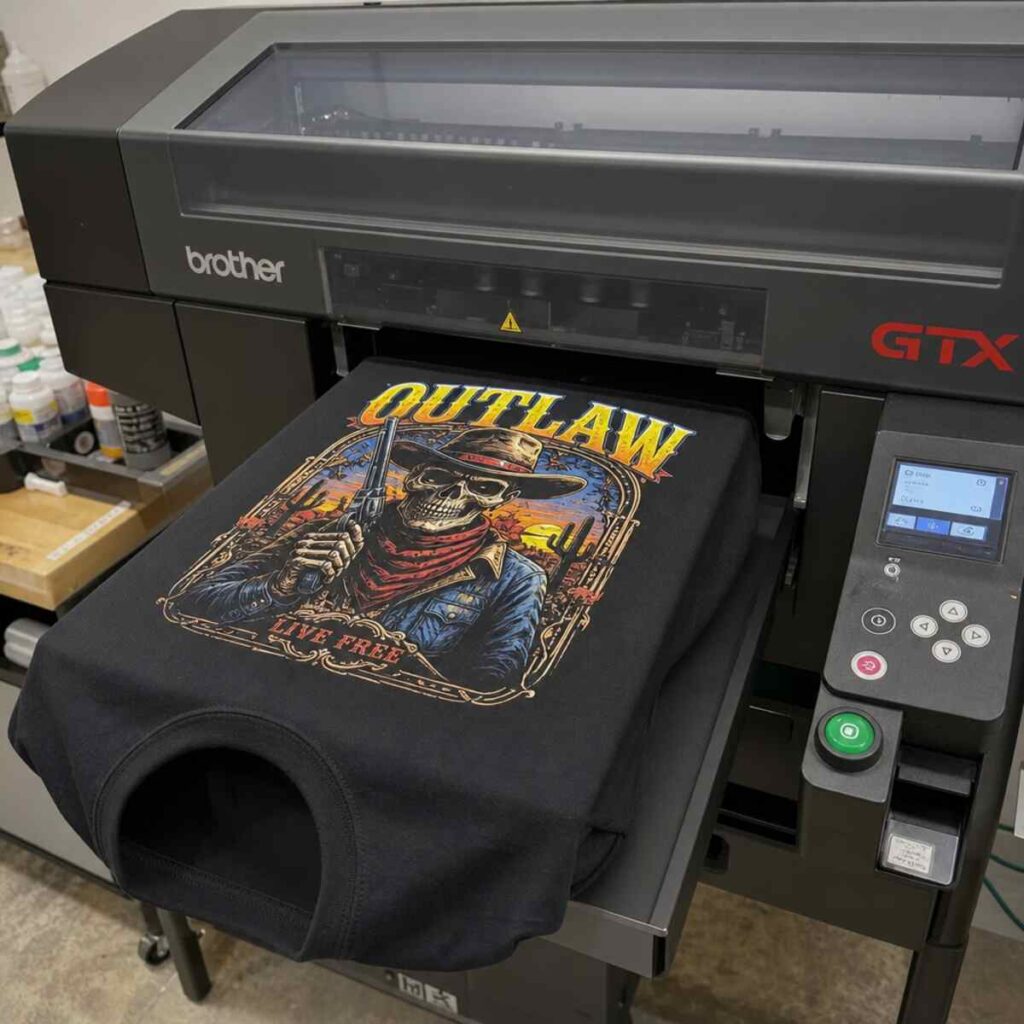
The custom apparel industry has undergone a massive transformation over the past two decades. Gone are the days when starting a clothing brand meant ordering thousands of pre-printed shirts and storing them in a garage, hoping they would sell. Today, technology allows creators, entrepreneurs, and established brands to produce retail-quality garments in quantities as low as one. At the heart of this revolution is the DTG printer. Find out the best info about dtg printer.
Direct-to-Garment (DTG) printing operates much like the inkjet printer sitting on your office desk, but instead of printing onto paper, it injects specialized textile inks directly into the fibers of a piece of clothing. This technology has leveled the playing field, making high-resolution, full-color printing accessible to everyone from basement hobbyists to massive fulfillment centers.
Whether you are looking into starting a small scale custom apparel business or you are a seasoned decorator looking to expand your shop’s capabilities, understanding the intricacies of a DTG printer is paramount. It is not just about pressing a button; it involves a synergy of mechanics, chemistry, software, and fabric science.
In this comprehensive guide, we will explore everything you need to know about DTG printing. We will cover how the technology works, the importance of garment preparation, maintenance protocols, business economics, and how it compares to other popular decoration methods. Let us dive in.
1. The Evolution of Custom Apparel Decoration
To truly appreciate the power of a DTG printer, it is helpful to look back at how garment decoration has evolved and where digital printing fits into the broader landscape.
Screen Printing vs Digital Apparel Printing
For decades, screen printing was the undisputed king of custom t-shirts. The process involves creating a stencil (a screen) for every single color in a design. Ink is then pushed through the stencil onto the shirt using a squeegee.
When looking at screen printing vs digital apparel printing, the differences in workflow, cost, and output are stark:
- Setup Time and Cost: Screen printing requires extensive setup. You must separate the artwork by color, output films, coat screens with emulsion, expose them, wash them out, and align them on a press. This makes it highly inefficient and expensive for small orders. Digital apparel printing, conversely, requires virtually zero physical setup. You load the digital file, place the shirt on the printer, and hit print.
- Color Limitations: Screen printing typically limits you to spot colors. While simulated process printing can achieve photographic results, it requires immense skill and high-end equipment. A DTG printer uses CMYK (Cyan, Magenta, Yellow, Black) inks to recreate millions of colors instantly, making it perfect for photographs, gradients, and highly detailed digital art.
- Minimum Order Quantities (MOQs): Because of the setup involved, screen printers usually require a minimum order (often 24 to 50 pieces). DTG allows for an MOQ of exactly one, which is the foundational pillar of the print on demand business model.
- Feel (Hand): Traditional plastisol screen printing sits on top of the fabric, leaving a noticeable, sometimes heavy, texture (known as the “hand”). DTG inks are water-based and bind directly with the fabric fibers, resulting in a remarkably soft hand that feels like part of the shirt.
While screen printing remains the most cost-effective method for massive bulk orders of simple designs, DTG printing dominates the landscape for short runs, complex artwork, and personalized apparel.
2. How Does a DTG Printer Work?
At its core, a DTG printer is an advanced, highly specialized inkjet printer. However, unlike printing on a flat, rigid piece of paper, printing on a flexible, porous, and textured surface like a t-shirt introduces a host of engineering challenges.
The Mechanics of the Machine
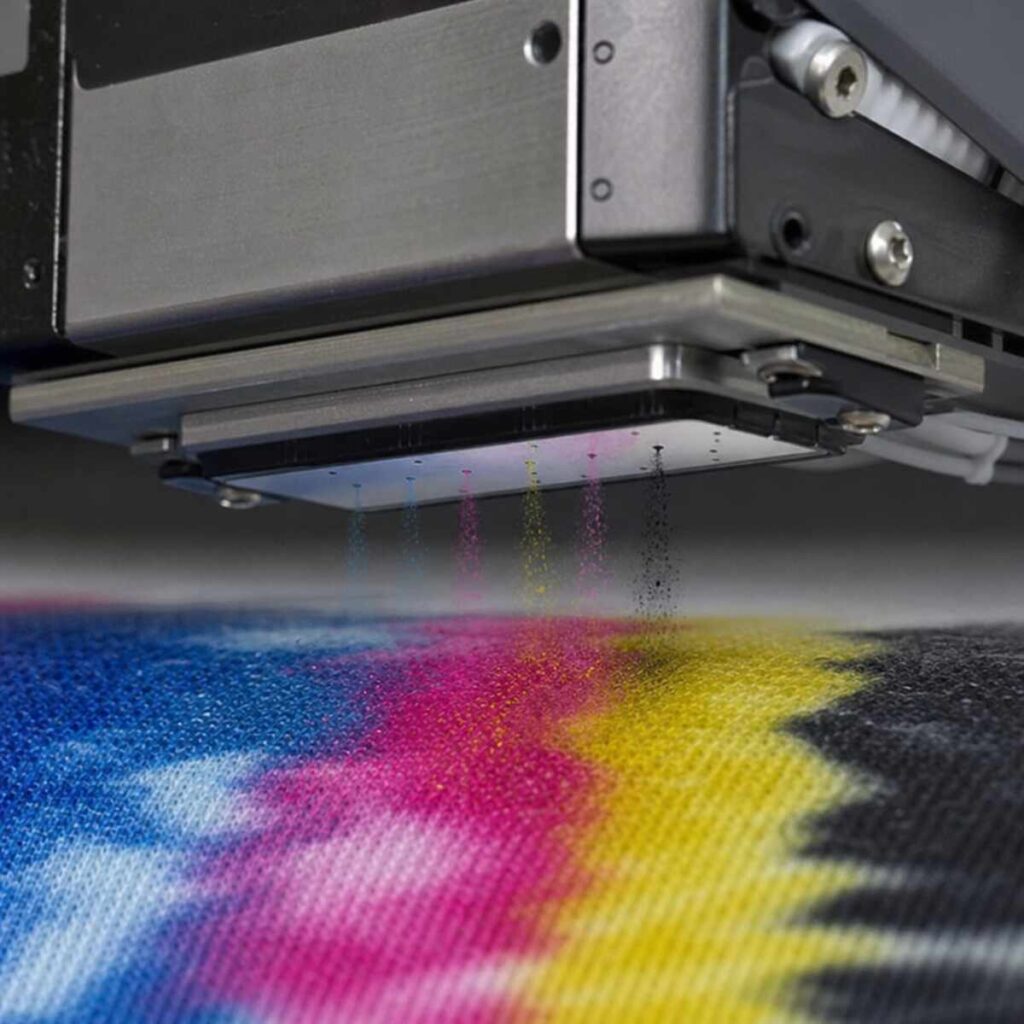
A standard DTG printer consists of a flat platen where the garment is loaded. A motorized system moves the platen into the machine, where a print head carriage glides back and forth over the fabric. The print heads contain thousands of microscopic nozzles that fire precisely timed droplets of ink onto the garment.
The Role of RIP Software
You cannot simply send a JPEG from your computer to a DTG printer using standard Windows or Mac print drivers. Instead, you use a Raster Image Processor (RIP).
Understanding RIP software features for color accuracy is critical for achieving professional results. The RIP software serves as the brain of the operation, performing several vital functions:
- Color Management: It translates the RGB colors on your monitor into the CMYK color space used by the printer. High-end RIP software uses ICC (International Color Consortium) profiles tailored to specific ink sets and fabrics to ensure the printed red matches the screen red.
- White Ink Generation: When printing on dark shirts, a white underbase is required so the colors pop. The RIP software automatically analyzes the transparent areas of your PNG file and generates a white ink layer to print beneath the color data.
- Choke and Spread: RIP software can slightly shrink (choke) the white underbase so that it does not peek out from underneath the colored ink layer, preventing an ugly white halo around your design.
- Ink Limiting: Different fabrics absorb ink differently. The software allows you to control the exact volume of ink dropped onto the shirt, saving you money and preventing ink pooling.
3. The Crucial Role of Pretreatment
If there is one aspect of DTG printing that catches newcomers off guard, it is pretreatment. If you are printing on a white or very light-colored shirt, you can often print CMYK inks directly onto the fabric. However, if you are printing on a dark shirt, you absolutely must use white ink.
Water-based white ink is thin and translucent. If sprayed directly onto a raw, dark cotton shirt, it will simply soak into the fibers and disappear. To prevent this, the garment must be pretreated.
What is Pretreatment?
Pretreatment is a liquid chemical solution—primarily composed of salts—that acts as a primer. When the white ink hits the pretreated surface, a chemical reaction occurs. The salts cause the titanium dioxide in the white ink to instantly flash-coagulate (gel up) on the surface of the fabric. This prevents the white ink from soaking in, creating a smooth, opaque white canvas for the CMYK colors to sit on top of.
How to Apply Pretreatment to Dark Shirts
Knowing exactly how to apply pretreatment to dark shirts is the difference between a retail-quality print and a faded, splotchy disaster. Here is the professional step-by-step process:
- Preparation: Ensure the garment is flat and lint-free. Use a lint roller to remove stray fibers.
- Application: You can apply pretreatment using a handheld HVLP (High Volume Low Pressure) paint sprayer, but for consistent, professional results, an automatic pretreatment machine is highly recommended. The goal is an even, consistent mist across the entire print area.
- Amount Matters: Applying too little pretreatment will result in dull, muted colors and poor wash durability. Applying too much can leave a stiff, crusty residue, cause the fabric to stain or scorch during curing, and lead to the ink flaking off in the wash. (Typically, 15 to 25 grams of fluid is ideal for a standard 14×16 inch print area, depending on the thickness of the shirt).
- Pressing the Fibers Flat: Once sprayed, use a soft bristle brush or a foam roller to gently work the fluid into the fabric in one direction. This lays down the microscopic fabric fibers, ensuring a smooth printing surface.
- Drying the Pretreatment: The shirt must be completely dry before it goes into the DTG printer. This is usually done using a heat press set around 330°F (165°C) for 30 to 45 seconds. Always place a sheet of parchment paper or a Teflon sheet over the shirt to protect the heat press platen.
4. Fabric Selection: Getting the Best Results
A DTG printer is only as good as the canvas it prints on. Because DTG inks are water-based, they are formulated specifically to bind with natural, cellulose-based fibers.
The Best Fabric for Digital Garment Printing
The absolute best fabric for digital garment printing is 100% ring-spun, combed cotton. Here is why:
- Ring-Spun vs. Carded Open-End: Standard, cheap promotional t-shirts are made of carded open-end cotton. These fibers are short, thick, and highly textured. When printed on, these stray fibers (fibrillation) poke through the ink layer, making the print look fuzzy and faded. Ring-spun cotton uses longer, tightly spun fibers that create a remarkably smooth, tight weave, allowing for crisp, high-resolution prints.
- Combed Cotton: Combing the cotton removes impurities and the shortest fibers, further enhancing the smoothness of the fabric face.
Printing on 100 Percent Cotton vs Polyester Blends
While 100% cotton is the gold standard, modern streetwear and athletic wear often utilize synthetic fibers. Understanding the dynamics of printing on 100 percent cotton vs polyester blends is vital.
- 100% Cotton: Yields the brightest colors, easiest pretreatment process, and highest wash durability with standard water-based DTG inks.
- Cotton/Poly Blends (e.g., 50/50, Tri-blends): Printing on blends is entirely possible but requires modified techniques. Because polyester is a plastic, water-based inks do not naturally bind to it. When heating polyester, the dyes used to color the fabric can sublimate (turn into gas) and bleed into your white ink, a phenomenon known as “dye migration.” To combat this, you must use a specialized pretreatment formulated for light polyester blends, apply a thicker white underbase, and cure the ink at a lower temperature for a longer period.
- 100% Polyester: Until recently, DTG printing on 100% dark polyester was considered impossible without massive dye migration and poor washability. While some advanced, specialized systems and specific poly-pretreatments exist today, it remains highly challenging and is generally not recommended for beginners.
5. The Ink: Formulations, Circulation, and Curing
DTG inks are highly engineered fluids. They must be thin enough to pass through microscopic print head nozzles without clogging, yet robust enough to withstand years of wearing and washing.
The Challenge of White Ink
CMYK inks are essentially liquid dyes and small-particle pigments. They are relatively easy to manage. White ink, however, is a different beast entirely. To achieve a bright, opaque white, manufacturers use a heavy mineral pigment called Titanium Dioxide (TiO2).
Because Titanium Dioxide is heavy, it naturally wants to settle at the bottom of the ink cartridge or tank, much like pulp in orange juice. If the white ink settles inside the lines or the print head, it will cause catastrophic, expensive clogs.
White Ink Circulation System Advantages
To combat settling, modern, high-quality DTG printers feature internal agitation and circulation systems. The white ink circulation system advantages are numerous:
- Reduces Waste: Older machines required operators to perform daily “heavy head cleanings” to flush out settled white ink, wasting massive amounts of expensive ink. Circulation systems keep the ink moving, drastically reducing the need for manual flushing.
- Improves Print Quality: By keeping the titanium dioxide perfectly suspended, the ink remains at the correct viscosity and opacity, ensuring bright, consistent white underbases on every print.
- Protects Hardware: Constant movement prevents pigment buildup inside the delicate internal channels of the print head, extending the life of your most expensive hardware component.
Curing the Print
Once the printer finishes its job, the ink is still wet. It must be cured to permanently bond the pigment to the fabric.
Curing ink using a commercial heat press is the most common method for small to medium shops. The process involves placing the freshly printed garment onto the press, covering it with protective paper, and applying heat and pressure.
- Temperature and Time: Most water-based DTG inks cure at around 320°F to 330°F (160°C – 165°C) for 90 to 120 seconds. However, always follow your specific ink manufacturer’s guidelines.
- Pressure: The pressure should be light to medium. Too much pressure will crush the ink into the garment, causing it to lose vibrancy and feel plasticky.
- Hovering: For heavy white ink prints, it is often best to “hover” the heat press an inch above the shirt for 15 seconds to let the surface moisture flash off before clamping it down. This prevents the wet ink from smearing or sticking to the protective paper.
For high-volume operations, forced-air conveyor dryers (tunnel dryers) are used instead of heat presses. These allow operators to place shirts on a moving belt, increasing production speed exponentially, though they require a larger physical footprint and specific electrical setups.
6. Maintenance and Troubleshooting for Longevity
Owning a DTG printer is somewhat like owning an exotic sports car. It offers incredible performance, but it requires strict, unwavering maintenance to keep it running optimally. Neglecting maintenance is the number one reason newcomers fail in the digital printing business.
Controlling the Environment
Water-based inks are highly sensitive to their environment. Understanding the humidity and temperature requirements for textile machines is non-negotiable.
- Humidity: DTG printers thrive in environments with 45% to 60% relative humidity. If the air is too dry, the water in the ink will evaporate while sitting on the print head nozzles, leading to rapid clogging. Most shops utilize commercial humidifiers and digital hygrometers to monitor the climate 24/7.
- Temperature: Room temperature should be kept stable, generally between 68°F and 78°F (20°C – 25°C). Extreme heat accelerates ink drying, while extreme cold can alter ink viscosity, causing misfires.
Industrial Print Head Maintenance Tips
To protect your investment, a strict maintenance schedule must be followed:
- Daily Agitation: Even with an automated circulation system, physically shake the white ink cartridges or bags at the start of your shift to ensure perfect pigment suspension.
- Wiper Blade Cleaning: The printer has a rubber wiper blade that cleans the print head (much like a windshield wiper). This blade must be cleaned daily with a specialized cleaning solution to prevent ink buildup from being smeared back onto the print head.
- Capping Station Maintenance: When not printing, the print head parks on a “capping station” that seals it from the air. This station must be kept perfectly clean and saturated with cleaning fluid so it can maintain an airtight seal.
- Nozzle Checks: Print a diagnostic nozzle check pattern every morning. This prints a tiny grid for every color. If lines are missing, you know a nozzle is clogged before you ruin a customer’s shirt.
Troubleshooting Clogged Inkjet Print Heads
Even with perfect maintenance, clogs happen. When troubleshooting clogged inkjet print heads, follow a systematic approach:
- Light Head Cleaning: Run the machine’s built-in automated cleaning cycle. This uses a small amount of ink to pressure-flush the nozzles.
- Wet Capping: If the clog persists, pool cleaning solution into the capping station, park the print head over it, and let it soak for several hours or overnight. This breaks down dried ink.
- Check the Dampers: Sometimes a “clog” is actually ink starvation. The dampers (small filters above the print head) may be full of air or blocked. Syringing ink through the dampers can re-prime the system.
- Avoid Aggressive Force: Never forcefully inject cleaning fluid directly into a print head with a syringe unless you are highly trained. The internal membranes are thinner than a human hair and will rupture, resulting in an immediate $1,500 to $3,000 replacement bill.
7. Evaluating Quality: Washability and Durability
The ultimate test of custom apparel is not how it looks when it comes off the heat press; it is how it looks after twenty trips through the washing machine.
Textile Pigment Ink Durability Standards
Reputable DTG ink manufacturers formulate their products to meet strict textile pigment ink durability standards, such as those set by the AATCC (American Association of Textile Chemists and Colorists). A properly printed and cured DTG garment should achieve an AATCC washability rating of 4.0 or higher out of 5.0, meaning it exhibits minimal fading or cracking after repeated standard wash cycles.
Factors Affecting Washability of Digital Textile Prints
The washability of digital textile prints relies on a perfect harmony of three factors:
- Proper Pretreatment: If pretreatment is applied unevenly or in the wrong quantity, the ink bond will fail.
- Proper Curing: If the ink is under-cured, the water has not fully evaporated, and the pigment has not permanently bound to the fabric. It will literally wash down the drain. Over-curing can scorch the shirt and cause the ink to become brittle and crack.
- Consumer Care: Educating your customer is vital. Always provide care instructions.
Actionable Care Instructions to Provide Customers:
- Machine wash inside-out in cold water.
- Use a gentle cycle with mild detergent.
- Do not use bleach or fabric softeners (which break down the ink).
- Tumble dry on low heat, or hang dry for best results.
- Never iron directly over the printed graphic.
8. DTG vs. DTF: Which is Right for You?
In recent years, a new digital technology has taken the industry by storm, prompting a massive debate: direct to film vs direct to garment technology.
Direct-to-Film (DTF) involves using a similar inkjet printer to print the design onto a special PET film. Wet ink on the film is then coated with a powdered thermoplastic adhesive, melted, and finally transferred onto the garment using a heat press.
Comparing the Two Technologies
Fabric Versatility:
- DTG: Excels on 100% cotton. Struggles heavily with 100% polyester, nylon, or heavily treated fabrics.
- DTF: Can be applied to almost any fabric—cotton, polyester, nylon, canvas, leather, and spandex. The powdered adhesive binds universally.
Feel (Hand) and Look:
- DTG: Offers the softest hand possible. On light shirts, it feels like nothing is there. On dark shirts, it has a minimal feel. It captures fine gradients and smoke effects flawlessly.
- DTF: Because it uses an adhesive layer, DTF acts more like a highly advanced vinyl transfer. It sits entirely on top of the garment. While modern DTF is much softer than old-school transfers, it will always have a slightly rubbery feel compared to DTG.
Workflow and Pretreatment:
- DTG: Requires spraying and drying pretreatment on dark garments, which can be messy and requires a learning curve.
- DTF: Bypasses pretreatment entirely. However, dealing with the messy adhesive powder (shaking, baking, and ventilation for toxic fumes) introduces its own workflow challenges.
Which should you choose? If your brand focuses on premium, retail-quality cotton t-shirts with incredibly soft, breathable graphics, DTG remains the undisputed champion. If you want to print heavily on synthetic athletic wear, hats, bags, and don’t mind a slightly heavier print feel, DTF is an incredibly versatile alternative. Many successful modern shops actually utilize both technologies to cover all bases.
9. Business Economics: Costs, Pricing, and Profitability
Understanding the mechanics of the machine is only half the battle. To run a successful enterprise, you must master the numbers. The agility of the print on demand model allows you to operate with zero inventory risk. You only produce a shirt after a customer has paid for it. However, to price your products correctly, you need accurate data.
Calculating Cost Per Shirt for Custom Printing
To determine your profitability, you must master the art of calculating cost per shirt for custom printing. Your Cost of Goods Sold (COGS) is not just the price of the blank shirt. You must account for all consumables and overhead.
Here is an example breakdown for a dark cotton t-shirt with a standard 10×12 inch graphic:
- Blank Garment: A high-quality, ring-spun cotton blank typically costs between $3.00 and $5.00 wholesale.
- Pretreatment Solution: Depending on the brand and application amount, pretreatment generally costs $0.20 to $0.45 per shirt.
- Ink Cost: CMYK ink is relatively cheap, but white ink is consumed heavily. RIP software will usually give you an exact ink cost calculation per design. On average, a medium-sized graphic on a dark shirt will consume $1.50 to $3.00 in ink. (Printing on a white shirt with no white ink often costs less than $0.50).
- Consumables: Heat press paper, shipping mailers, and printer maintenance fluids add roughly $0.50 per order.
- Labor & Overhead: Factor in hourly wages, electricity, rent, and internet. Let’s estimate this at $2.00 per shirt for a small shop.
Total Estimated COGS (Dark Shirt): $3.50 (Blank) + $0.30 (Pretreatment) + $2.00 (Ink) + $0.50 (Consumables) + $2.00 (Overhead) = $8.30 per shirt.
If you retail this custom, high-quality shirt for $25.00 to $30.00, you are looking at a very healthy gross profit margin, which leaves plenty of room for marketing and customer acquisition costs.
Starting a Small Scale Custom Apparel Business
If you are considering starting a small scale custom apparel business with a DTG printer, here are actionable steps to ensure a strong launch:
- Niche Down: Do not just be a general “custom t-shirt shop.” Find a specific audience. Create apparel for dog breed enthusiasts, local coffee shops, retro gaming fans, or niche fitness communities. A targeted audience is cheaper to market to.
- Invest in Quality Blanks: Customers will associate the quality of the print with the quality of the shirt. Do not print a gorgeous design on a stiff, scratchy $2.00 blank. Use premium blanks from brands like Bella+Canvas, Next Level, or AS Colour to justify higher retail prices.
- Master the Pretreatment First: Before launching your website, spend your first week doing nothing but testing pretreatment levels and wash-testing your garments. Do not let your first paying customers be your guinea pigs.
- Leverage E-Commerce Integrations: Modern DTG shops thrive on automation. Build your store on Shopify or WooCommerce and integrate it with order management software. When an order drops, the artwork and shipping details should route directly to your print queue seamlessly.
- Create Perceived Value: Unboxing matters. Use custom polymailers, include a branded sticker, and attach professional hangtags. A $30 print-on-demand shirt should feel like a premium boutique purchase.
Conclusion
The world of digital garment decoration is highly dynamic, blending creative artistry with advanced mechanical engineering. A DTG printer is far more than a simple output device; it is a gateway to unlimited creative expression and a powerful tool for modern e-commerce.
From understanding why the evolution from traditional methods like screen printing vs digital apparel printing occurred, to mastering the chemistry of how to apply pretreatment to dark shirts, success in this industry demands attention to detail. You must respect the machine by providing strict climate control to meet the humidity and temperature requirements for textile machines, and follow rigorous industrial print head maintenance tips to prevent dreaded clogs.
Furthermore, by selecting the best fabric for digital garment printing, utilizing RIP software features for color accuracy, and properly curing ink using a commercial heat press, you can guarantee a final product that easily meets strict textile pigment ink durability standards.
Whether you decide to stick strictly to pure cotton DTG printing or explore the complementary benefits of direct to film vs direct to garment technology, the foundation remains the same: quality input equals quality output. By accurately calculating cost per shirt for custom printing and leveraging the power of print on demand, starting a small scale custom apparel business has never been more achievable.
Take the time to learn the science behind the ink, master your workflow, and focus on delivering an incredible product. The custom apparel market is vast, and with a well-maintained DTG printer running efficiently in your shop, your potential for growth is limited only by your imagination.